



SKU: 200000182:366#Green Light-1
White Red Blue Green 12-24V Moon Type Thermometer Voltmeter Clock LED Display Car Dashboard Clock Dual Temperature Sensor
White Red Blue Green 12-24V Moon Type Thermometer Voltmeter Clock LED Display Car Dashboard Clock Dual Temperature Sensor
In stock
-
All orders are dispatched the next business day!
-
We will beat any price. We back all products with a 1 year guarantee.
Order in the next 0 hours 0 minutes to get it by /09/2026
Couldn't load pickup availability
Guaranteed Safe Checkout
SPECIFICATIONS
Brand Name: XINWMS
Case Shape: Irregular
Choice: yes
Dial Display: Digital
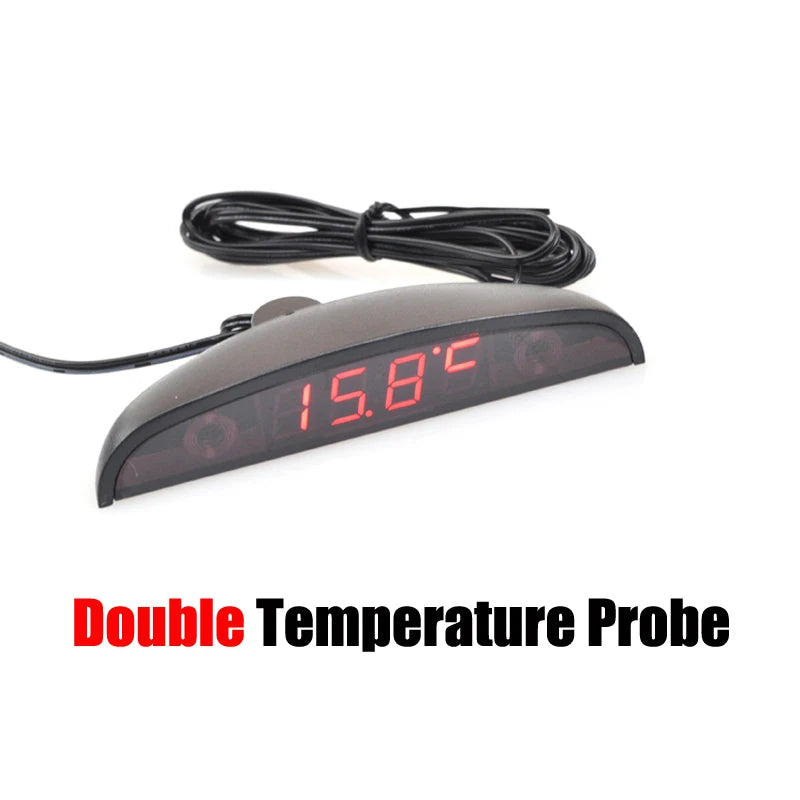
Display Information: Time,In Temperature,Outside Temperature,Voltage
High-concerned chemical: None
Origin: Mainland China
Placement: Dashboard
semi_Choice: yes
Description:
1. Working voltage:DC 8-30V
2. It can measure and display the temperature inside and outside of car.
3. Temperature display range:-40 ~ 120 Centigrade
4. With temperature error correction setting function.Setting range -5~5 Centigrade
5. Measure temperature range:6 ~ 28V.
6. With voltage error correction setting function.Setting range -0.5V ~ 0.5V
7. 6kinds display mode:
1>. Display date only;
2>. Display time only;
3>. RT0 display temperture only;
4>. RT1 display temperture onley;
5>. Display voltage only;
6>. Displayed alternately above;
NOTE:ON displayed alternately mode,user can select display by "dd" option.
1>. dd:0 display:time+RT0+RT1+voltage
2>. dd:1 display:time+RT0+RT1
3>. dd:2 display:time+RT0+voltage
4>. dd:3 display:time+voltage
8. Digital tube brightness correction settings(LL:xx).The larger the number, the brighter the LED.
9. Automatic brightness control settings(AL:0):"1" Valid, "0" invalid.This function means:Brightness will automatically become "1" at 19:00 to 6:00
10. Set display the time interval at Displayed alternately.
11. temperature probe : 0.3meter and 1.5meter, the single verison only have 1.5meter proble
NOTE:
Please don't set DF to "0",Otherwise it will jump to a black screen
Single temperature version don't have TR1 and dd parameter don't have dd:2
In a non adjustable state (without flashing), pressing the "right button" will switch the display mode
How to use:
Keyboard plate has two touch keys: L (left), R (right);
1. Under normal use, touch the "L", "minute" starts flashing, then press the "R", "minute" increases between 00 to 59 cycles. After setting "minute" and then press the "L", "hour" starts flashing, it increases between 00 to 23 cycles. After setting "hour" and press "L" to adjust the date, then "date" starts flashing, press UP to increase between 1 to 31 cycles, then is month , and year , the same as hours.
2. Then press "L" , displayed 0.0V, this is voltmeter error adjustment, from -0.5-0.5V.
3. Then press "L" , displayed Ac: 0, this is thermometer error adjustment, from -5~5 Celsius
4. Then press "L" , dd:0 means show time + temperature + voltage, dd:1 means show time + temperature, dd:3 show means time + voltage.
5.Then press "L", dF:x mean cyclic display interval time, do not set dF:0, it will be black screen.
6. Then press "L", LL:x mean bright adjustment.
7.Then press "L", AL:x mean brightness automatic control settings, AL:0 mean not automatic control, AL:1 mean the brightness will automatic swtich 1 level in 19:00~6:00.
Included:
1X Watch
1 x adhesive tape
Description
Description
SPECIFICATIONS
Brand Name: XINWMS
Case Shape: Irregular
Choice: yes
Dial Display: Digital
Display Information: Time,In Temperature,Outside Temperature,Voltage
High-concerned chemical: None
Origin: Mainland China
Placement: Dashboard
semi_Choice: yes
Description:
1. Working voltage:DC 8-30V
2. It can measure and display the temperature inside and outside of car.
3. Temperature display range:-40 ~ 120 Centigrade
4. With temperature error correction setting function.Setting range -5~5 Centigrade
5. Measure temperature range:6 ~ 28V.
6. With voltage error correction setting function.Setting range -0.5V ~ 0.5V
7. 6kinds display mode:
1>. Display date only;
2>. Display time only;
3>. RT0 display temperture only;
4>. RT1 display temperture onley;
5>. Display voltage only;
6>. Displayed alternately above;
NOTE:ON displayed alternately mode,user can select display by "dd" option.
1>. dd:0 display:time+RT0+RT1+voltage
2>. dd:1 display:time+RT0+RT1
3>. dd:2 display:time+RT0+voltage
4>. dd:3 display:time+voltage
8. Digital tube brightness correction settings(LL:xx).The larger the number, the brighter the LED.
9. Automatic brightness control settings(AL:0):"1" Valid, "0" invalid.This function means:Brightness will automatically become "1" at 19:00 to 6:00
10. Set display the time interval at Displayed alternately.
11. temperature probe : 0.3meter and 1.5meter, the single verison only have 1.5meter proble
NOTE:
Please don't set DF to "0",Otherwise it will jump to a black screen
Single temperature version don't have TR1 and dd parameter don't have dd:2
In a non adjustable state (without flashing), pressing the "right button" will switch the display mode
How to use:
Keyboard plate has two touch keys: L (left), R (right);
1. Under normal use, touch the "L", "minute" starts flashing, then press the "R", "minute" increases between 00 to 59 cycles. After setting "minute" and then press the "L", "hour" starts flashing, it increases between 00 to 23 cycles. After setting "hour" and press "L" to adjust the date, then "date" starts flashing, press UP to increase between 1 to 31 cycles, then is month , and year , the same as hours.
2. Then press "L" , displayed 0.0V, this is voltmeter error adjustment, from -0.5-0.5V.
3. Then press "L" , displayed Ac: 0, this is thermometer error adjustment, from -5~5 Celsius
4. Then press "L" , dd:0 means show time + temperature + voltage, dd:1 means show time + temperature, dd:3 show means time + voltage.
5.Then press "L", dF:x mean cyclic display interval time, do not set dF:0, it will be black screen.
6. Then press "L", LL:x mean bright adjustment.
7.Then press "L", AL:x mean brightness automatic control settings, AL:0 mean not automatic control, AL:1 mean the brightness will automatic swtich 1 level in 19:00~6:00.
Included:
1X Watch
1 x adhesive tape
Item Specifics
Item Specifics


Have a Question?
Testimonials
Great Selection and Fast Shipping!One of the best companies in terms of service and commitment. Excellent
service, high quality, speed of completion, and a professional and
cooperative team. A great experience, and I confidently recommend
dealing with them.
- Ahmed Askar
One of the best companies in terms of service and commitment. Excellent
service, high quality, speed of completion, and a professional and
cooperative team. A great experience, and I confidently recommend
dealing with them.
- Ahmed Askar
Excellent Customer Service!I had an issue with my order, and I contacted the customer service team for assistance. I was pleasantly surprised by their prompt response and willingness to help resolve my issue. They were courteous and professional throughout the entire process, and they went above and beyond to ensure my satisfaction. Kudos to the customer service team for their exceptional service!
- Hani Ahmed
I had an issue with my order, and I contacted the customer service team for assistance. I was pleasantly surprised by their prompt response and willingness to help resolve my issue. They were courteous and professional throughout the entire process, and they went above and beyond to ensure my satisfaction. Kudos to the customer service team for their exceptional service!
- Hani Ahmed
Best Prices Around!Their service is fast, professional, and their equipment is reliable. I
loved dealing with them and recommend trying their products and services
👍
- Ahmed Fuad
Their service is fast, professional, and their equipment is reliable. I
loved dealing with them and recommend trying their products and services
👍
- Ahmed Fuad
Impressive teamMy experience with Tam Store was excellent from the very first moment — the team was helpful and patiently walked me through every detail before I made my decision. Their laptop repair service was professional in every sense — they diagnosed the issue quickly, and I never had to come back for the same problem. Even the products I bought from them are 100% genuine, and the prices are competitive compared to other stores I've tried before. Tam Store is now my go-to place for buying any device or getting my laptop serviced 👌
- Ashwaq Musallam
My experience with Tam Store was excellent from the very first moment — the team was helpful and patiently walked me through every detail before I made my decision. Their laptop repair service was professional in every sense — they diagnosed the issue quickly, and I never had to come back for the same problem. Even the products I bought from them are 100% genuine, and the prices are competitive compared to other stores I've tried before. Tam Store is now my go-to place for buying any device or getting my laptop serviced 👌
- Ashwaq Musallam
